- This event has passed.
STEMGenius Holiday Coding and Robotics Program
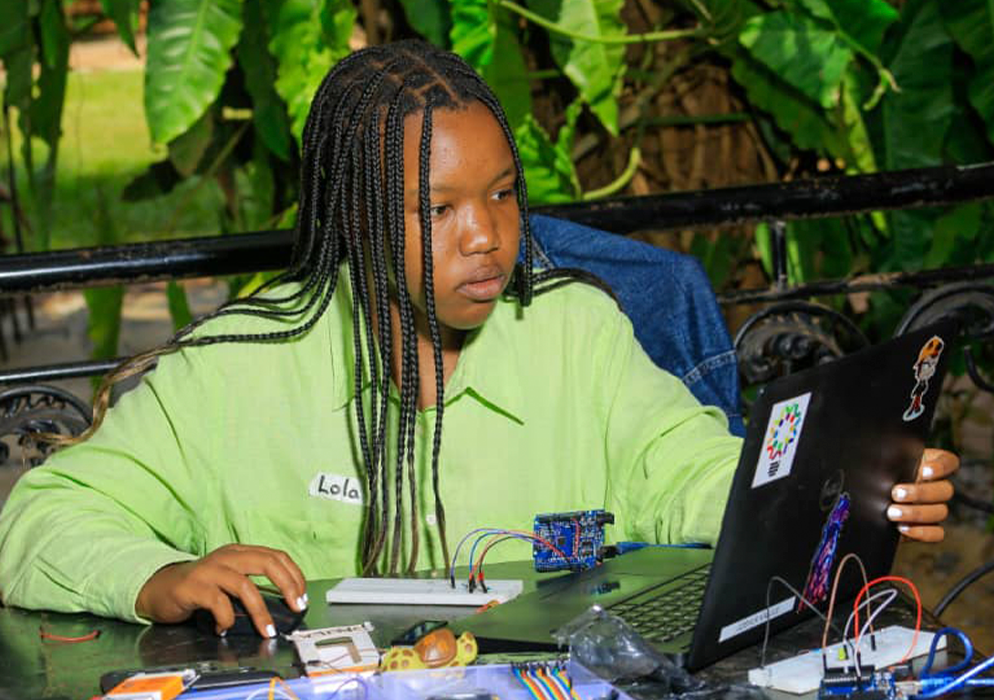
Theme: Give your child a jump-start to thriving in today’s digital world
- Duration: (3 months)
- Flexible time slots: (10 am-11:30 pm, 2 pm-3:30 pm)
- Learners invited: P.7, S.4, S.6 & other classes
- Closing Demo Day
What Will You Learn?
1. Scratch Programming
i) Scratch – Level 1
Activities
Introduction to the features and feel of the Scratch platform
Manipulating sprites and backdrops with various techniques
Understanding and application of foundational logic block categories
Outcome
Stories, animations, and games driven by simple logic and designs
ii) Scratch – Level 2
Activities
Understanding and application of conjoining logic block categories
Integration of the foundational and conjoining logic block
Application of conditional and comparison logic
Outcome
Stories, animations, and games driven by interactive logic and designs
2. Python Programming:
TRACK 1: INTRODUCTION TO PYTHON DEVELOPMENT
📘 Beginner Level
Python Basics
- What is Python? Why use it?
- Installing Python and using IDLE or VS Code
- Writing your first program: print(“Hello, world!”)
- Variables and data types: int, float, str, bool
- Simple math operations
Control Flow
- Conditional statements: if, elif, else
- Comparison and logical operators
- Loops: for, while
- Mini project: Number guessing game
Functions and Collections
- Defining and calling functions
- Parameters and return values
- Lists and tuples
- Dictionaries and sets
- Mini project: To-do list app
📗 Intermediate Level
Working with Strings and Files
- String manipulation: slicing, formatting
- Reading and writing files
- Exception handling: try, except
- Mini project: Simple text editor
Modules and Libraries
- Importing modules: math, random, datetime
- Creating custom modules
- Using pip to install packages
- Mini project: Dice roller with GUI (using tkinter)
Object-Oriented Programming (OOP)
- Classes and objects
- Attributes and methods
- Inheritance and encapsulation
- Mini project: Student management system
📙 Advanced Level
Advanced Concepts
- Recursion
- Lambda functions and list comprehensions
- Decorators and generators
- Mini project: Quiz app with scoring
Real-World Applications
- Web scraping with BeautifulSoup
- Automation with pyautogui
- Introduction to APIs
- Final project: Build a weather dashboard using API
TRACK2: PYTHON WEB DEVELOPMENT WITH DJANGO/FLASK
🧭 Introduction & Setup
🔹 Concepts
- What is Django? Why use it?
- Difference between frontend and backend
- MVT architecture (Model-View-Template)
- Installing Python, pip, and Django
- Creating your first Django project
🛠️ Activities
- Set up virtual environment
- django-admin startproject mysite
- Run development server: python manage.py runserver
🧪 Mini Project
- “Hello Django” homepage with custom message
🧭 Apps, URLs, and Views
🔹 Concepts
- Django apps: modular structure
- URL routing with urls.py
- Views: function-based and class-based
- Templates and static files
🛠️ Activities
- Create app: python manage.py startapp blog
- Define views and link to URLs
- Use HTML templates and CSS
🧪 Mini Project
- Personal portfolio site with multiple pages
🧭 Models and Admin Panel
🔹 Concepts
- Django ORM (Object-Relational Mapping)
- Creating models and migrations
- Admin panel customization
🛠️ Activities
- Define models: Post, Student, etc.
- Run migrations: makemigrations and migrate
- Register models in admin.py
🧪 Mini Project
- Student record manager with admin interface
🧭 Forms and CRUD Operations
🔹 Concepts
- Django forms: forms.py
- Handling GET and POST requests
- CRUD: Create, Read, Update, Delete
🛠️ Activities
- Build forms for user input
- Use ModelForm for easy form creation
- Implement CRUD views and templates
🧪 Mini Project
- Blog with post creation, editing, and deletion
🧭 Authentication and User Management
🔹 Concepts
- User registration and login
- Sessions and cookies
- Permissions and access control
🛠️ Activities
- Use Django’s built-in User model
- Create login/logout views
- Restrict access to certain pages
🧪 Mini Project
- Secure dashboard for logged-in users
🧭 Deployment and Project
🔹 Concepts
- Preparing for deployment
- What is CI/CD? Why is it important?
- Version control with Git
- Hosting code on GitHub
- Automating deployment with GitHub Actions
- Deploying to PythonAnywhere or Render
- Environment variables and security
🛠️ Activities
- Push code to GitHub
- Set up a project on PythonAnywhere
- Configure static files and database
🧪 Final Project
- Creative student project with full CRUD, authentication, and deployment
Robotics/Arduino Outline
P7 Vacists: Let’s Build and Code with Arduino!
Get ready to bring your ideas to life with fun, hands-on projects using TinkerCAD and Arduino!
You’ll explore:
- ⚙️ Cool Circuit Parts – Learn what each component does and how to connect them!
- 💡 Arduino Coding Basics – Discover how to make your circuits come alive with code.
- 🧩 Ports on the Arduino Board – Find out what each port does and how to use them.
- 🔌 Simple Breadboard Circuits – Build your first real electronic circuits step by step.
Make it blink, buzz, and move. The future inventor starts with you!
S4 Vacists: Robotics and Real-World Innovation with Arduino
Take your creativity to the next level with TinkerCAD and Arduino, where electronics meet programming!
You’ll dive into:
- 🤖 TinkerCAD for Robotics – Design and simulate real robotic systems.
- 💻 Arduino Programming Mastery – Write, debug, and upload your own code.
- ⚡ Electrical Circuits in Action – Build and understand current, voltage, and resistance circuits.
- 🧠 Problem Solving through Debugging – Learn how to fix and optimize your code like a pro.
- 🌍 Real-World Sensor Projects – Use sensors to bring your ideas to life in smart and interactive ways.
Turn your curiosity into innovation. Create, code, and control the future!
Arduino with STEMGenius
At STEM Genius, we make learning electronics fun, creative, and hands-on.
Through the Arduino Program, students explore how circuits, sensors, and code come together to power real-world inventions, from smart lights to robotic systems.
Whether you’re a beginner just discovering electronics or an aspiring engineer ready to create prototypes, this course helps you think, build, and solve like a maker.
Level 1: Beginner – Getting Started with Arduino
Theme: Build simple circuits and make your first code come alive.
What You’ll Learn
- Discover what Arduino is and how it works
- Identify key electronic components, inputs, outputs, sensors, LEDs, and power sources
- Understand electricity basics: current, voltage, and resistance (Ohm’s Law)
- Set up your Arduino IDE and upload your first program
- Simulate and build your first blinking light and traffic light circuits using TinkerCAD
- Learn basic coding logic (loops, delays, input/output commands)
Mini Projects
- LED Blinking Light
- Traffic Light System
- Automatic Street Light with LDR
Skills Gained
- Circuit building
- Problem-solving with electronics
Beginner-level programming
Level 2: Intermediate – Smart Circuits & Sensors
Theme: Make your projects think, sense, and respond.
What You’ll Learn
- Work with ultrasonic sensors, LCD displays, and servo motors
- Understand Trig and Echo functions for measuring distance
- Use libraries to expand Arduino capabilities
- Apply math and logic in projects , calculate distance, display readings, and control devices
- Build and debug text-based code
Mini Projects
- Distance Measuring Device
- Anti-Collision Parking Alarm
- Smart Dustbin with Automatic Lid
Skills Gained
- Sensor integration and data display
- Advanced wiring and code debugging
- Automation using real-world logic
Level 3: Advanced – From Prototype to Product
Theme: Innovate for real-world impact.
What You’ll Learn
- Combine previous skills to create custom devices
- Go through the ideation and product design process
- Prototype, test, and refine your inventions
- Present your project idea , from concept to finished product
Capstone Project
Design and present a working model that solves a real-world problem using Arduino, such as a smart plant watering system, home alarm, or temperature monitor.
Skills Gained
- End-to-end product development
- Presentation and pitching
- Engineering design thinking
Materials You’ll Work With
- Arduino Uno Board
- Breadboard and Jumper Wires
- LEDs (Red, Yellow, Green)
- Resistors and Photoresistors
- Thermometers and Pushbuttons
- Ultrasonic Sensors and Servo Motors
- LCD Displays
- DC Motors and Buzzers
- Power Supply (Battery Snap or Adapter)
Sponsors